Changelog — iOS 1.2.3
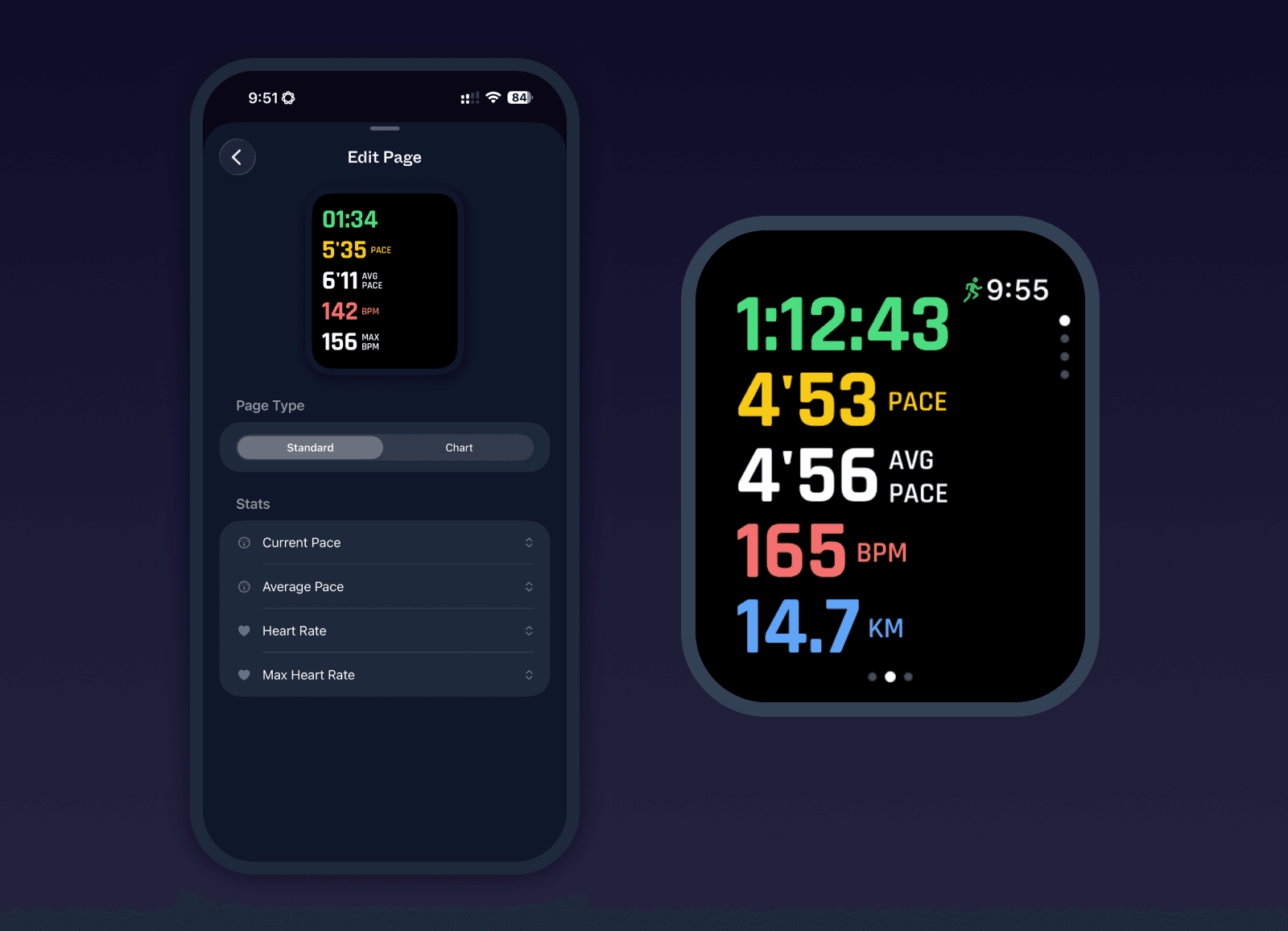
Fully Customizable Watch Live Stats
The live stats surface on Apple Watch has been rebuilt from the ground up. You can now fully customize your stats pages per activity type, adding, removing, reordering, and editing each page to match how you train. Each page can be configured as a stats page with 5 stats per page, or as a chart page for power or heart rate. Every stat slot is editable, including pace, max and average power, and max and average heart rate.To help everyone find the new setting, there is a one-time reset to sensible defaults per activity type.
Split Alerts for Cycling
Cycling now has its own split distance setting, independent from running, so you can use a longer threshold on the bike. The split alert recap on the watch also picks the most relevant stats based on what the ride actually recorded, using a priority order of power, distance, heart rate, moving time, and speed. The Split Alerts settings on the watch are now grouped under their own section to make them easier to find.
Faster, Clearer Activity Regeneration on Watch
Regenerating an activity on the watch now shows a live progress sheet with step-by-step status, covering preparing, finalizing, building the FIT file, updating Apple Health, and syncing. You can cancel from the sheet, dismiss it while regeneration continues in the background, and see honest messaging if a step is skipped or times out. Apple Health writes are now far lighter too, so finalize is dramatically faster for long activities. A prior case where regeneration could hang indefinitely on "Regenerating..." has also been fixed.
Bug fixes and improvements
Live Activity view on the phone opens correctly at the small detent again
Deselecting a route during a live activity on the phone now actually removes the route from the map
Live stats on the phone update reliably during a workout, even when the watch is not the active app
Fixed a watch stats sizing bug where numbers could overflow their slots
Power meter source label now returns correctly after a Bluetooth sensor disconnects and reconnects
Added a confirmation dialog before ending a live activity from the phone to prevent accidental stops
Added an option to update average watts and distance after any bike ride, indoor or outdoor, including rides recorded with a Bluetooth power meter, for cases where sensor data was off or the connection dropped
Improved outdoor cycling auto-pause so it triggers more reliably when you stop riding
Fixed a rare auto-pause loop after a manual pause that could vibrate on and off for minutes and force ending and restarting the activity
Bluetooth sensors view now always keeps a working dismiss button so you can always leave the sensor list, including when you opened it from inside a live activity
Unified the Bluetooth sensors view layout across connecting, connected, calibrating, and calibration complete states
Rewrote the watch reachability label in phone Apple Watch settings so it no longer reads as misleading when the watch is just not in focus
Fixed a watch app crash caused by the live route overlay during outdoor runs
Fixed a first-lap timing bug on the watch so the opening segment of a workout is no longer missing from HealthKit
HealthKit laps now include rich per-lap metadata Milo already tracks, such as distance, duration, average heart rate, average speed, and elevation gain, so third-party apps can read the full lap breakdown
Activity averages now skip gaps in the data instead of counting missing points as zero, so average heart rate, power, and speed are more accurate
Centralized activity average calculations so numbers match across activity detail, sharing, and exports
Fixed an app-launch flicker that briefly showed insight banners and onboarding items before data finished loading
Resolved a row-level-security issue that could block new workouts from being created for some accounts
Added a new stats layout for sharing an activity from the detail view