Changelog — iOS 1.1.6
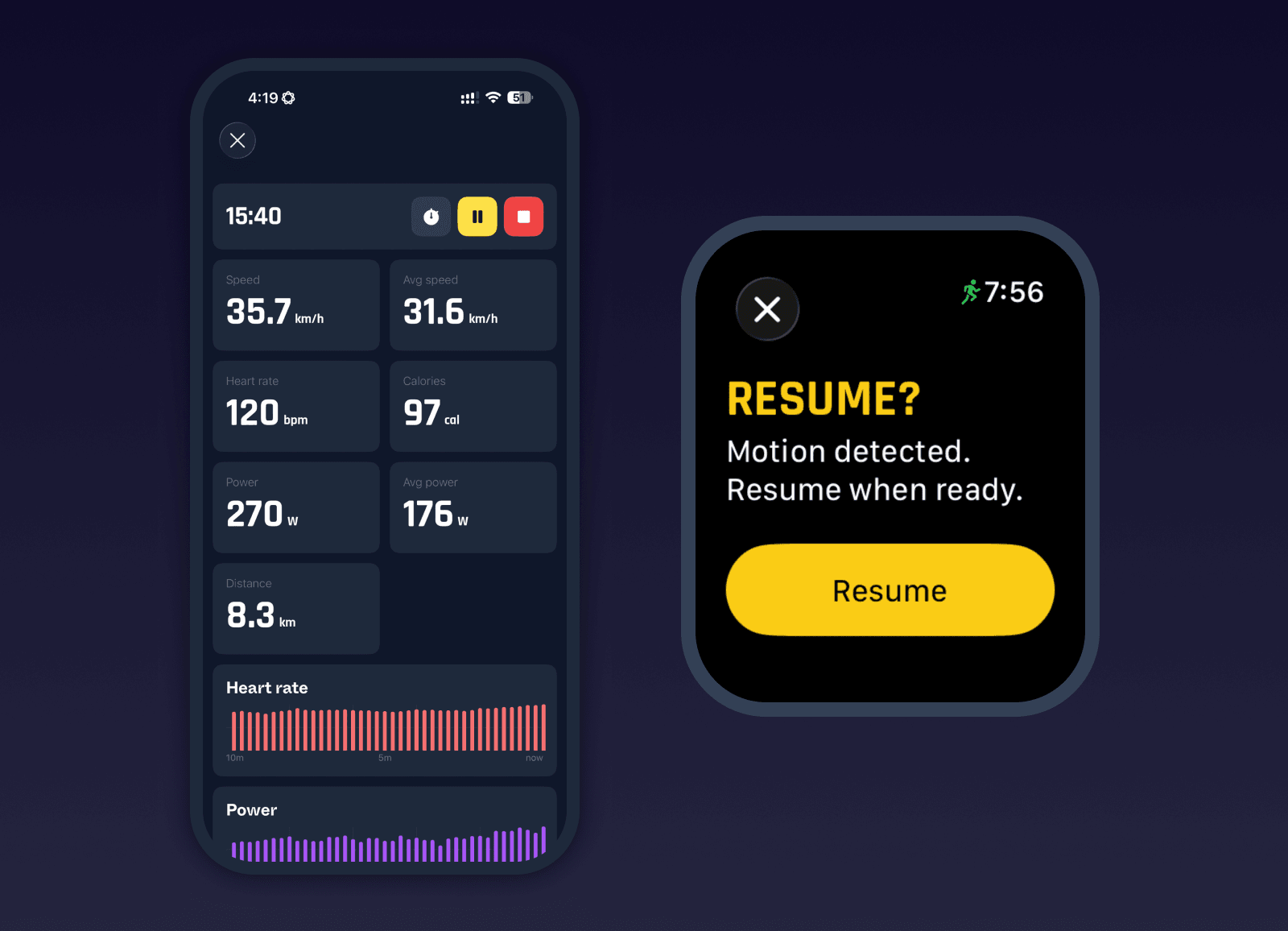
New Auto-Pause and Resume Reminders
Milo now introduces auto-pause and resume reminders for outdoor running and cycling. These are new features and can be enabled in the Milo settings (Phone preferences or Watch tracking).
Auto-pause will automatically pause an activity when you stop moving. Resume reminders will detect when motion resumes after a manual pause and prompt you to continue the activity, helping avoid forgotten pauses and inaccurate data.
Live Activity Charts on Phone
Live activity views on the phone now display heart rate and power charts during workouts. This gives you real-time visual feedback while training and makes the phone a much more useful companion for monitoring effort during an activity.
Power and Indoor Activity Improvements
Power meter support has been expanded. You can now calibrate sensors directly, and power data is used to estimate distance and speed for indoor cycling. This results in more meaningful indoor rides and allows indoor workouts to contribute more accurately to your overall stats and training load.
Sleep Analysis Improvements
Sleep analysis has been significantly improved. Milo now incorporates more dimensions such as your average bedtime and average sleep duration, comparing your patterns against your own historical data as well as science-backed benchmarks. This results in a more accurate and meaningful sleep score and better context for recovery and training readiness.
Bug fixes and improvements
Laps now supported across all activity types, using heart rate when needed
Added heart rate and power charts to live activity view on phone
Improved auto-pause behavior across running, walking, and cycling
Added resume reminders when motion is detected during manual pause
Added power meter calibration and improved sensor connection feedback
Improved de-duplication logic, better handling incomplete or partial activities
Added exportable diagnostics for duplicate handling in Data Management
Improved watch sync flow, reducing failures and improving retry handling
Improved HealthKit sync timing and consistency after activity completion
Ensured TRIMP updates can sync after HealthKit changes
Improved battery and metadata handling during activity completion
Improved indoor activity handling and correction flows
Fixed sleep analysis bugs and improved scoring accuracy
Improved sleep data refresh and reduced stale insights
Improved live stats display and formatting during workouts
Reduced background workload during activities for better stability and battery
Improved settings UI, navigation, and sheet presentation
Fixed dark mode inconsistencies across multiple views
Improved watch log transfer feedback
Fixed app logs upload reliability