Changelog — iOS 1.1.0
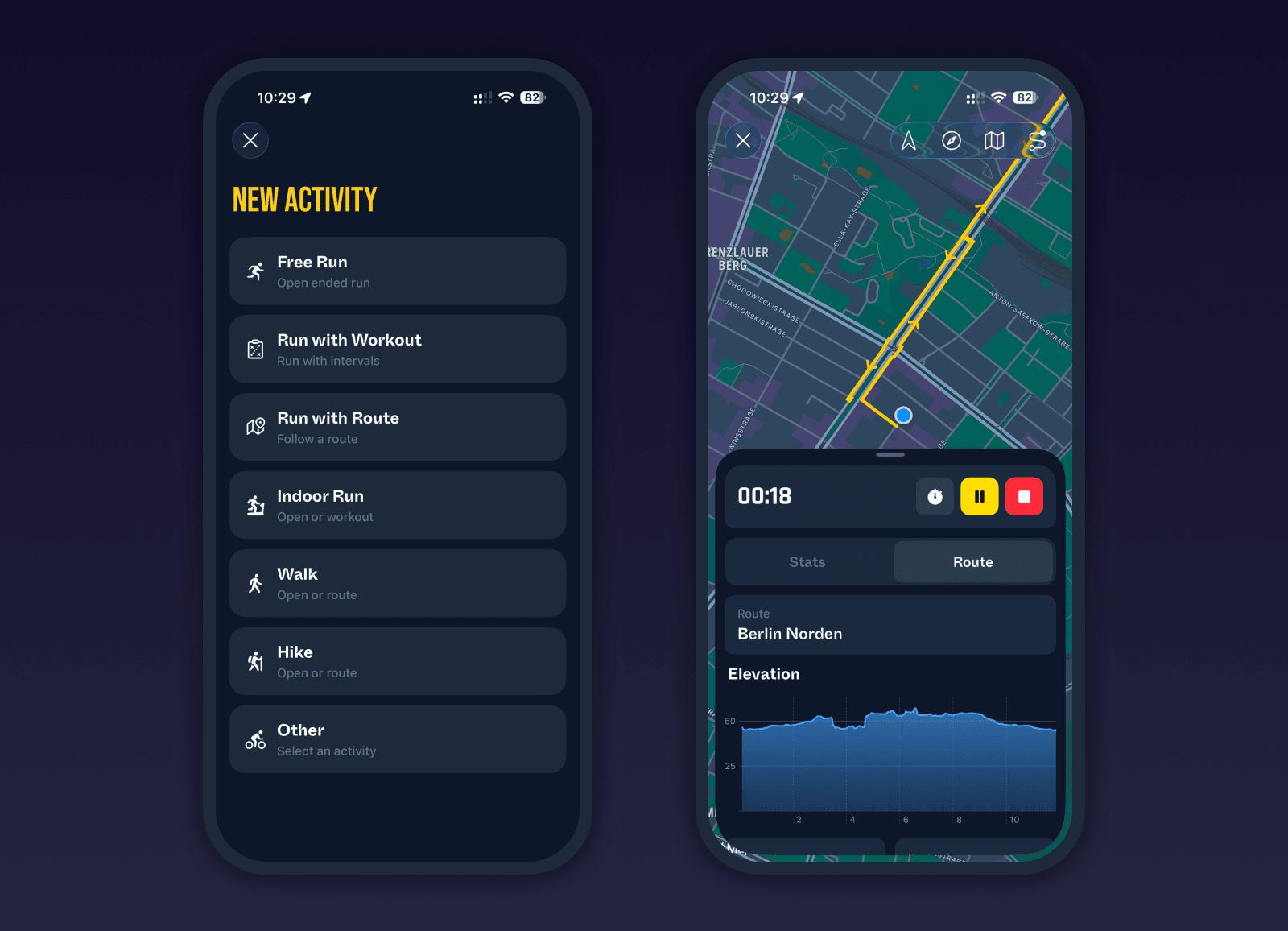
New Phone Live Activity Experience
Live activities can now be started and controlled directly from the phone. A new persistent activity button in the tab bar allows you to launch activities whenever the watch app is installed.
The watch remains the source of tracking, but the phone can now handle the full control flow during a workout. You can select the activity type, choose a workout, start tracking, pause, resume, trigger laps, and end the activity. After finishing, the phone immediately shows a full activity summary.
This lays the groundwork for future features where the phone can play a larger role during activities. It also makes it much easier to review laps or splits and interact with maps and routes while an activity is in progress.
Bug fixes and improvements
Fixed activity list item tokens that could cause layout overflow
Fixed activity list spacing and width issues
Added training load fallback calculation when values are missing
Added weather condition icons to Today summary weather chart
Improved best time to run suggestions based on weather forecast
Added persistent activity button in tab bar to launch activities from phone
Added expanded live stats display during activities on phone
Added new activity summary view immediately after completion on phone
Improved route map viewing during live activities on phone
Added indoor ride speed and distance calculation using power meter data
Added cleanup for stale route location data at the beginning of activities