Changelog (iOS) — 1.0.8
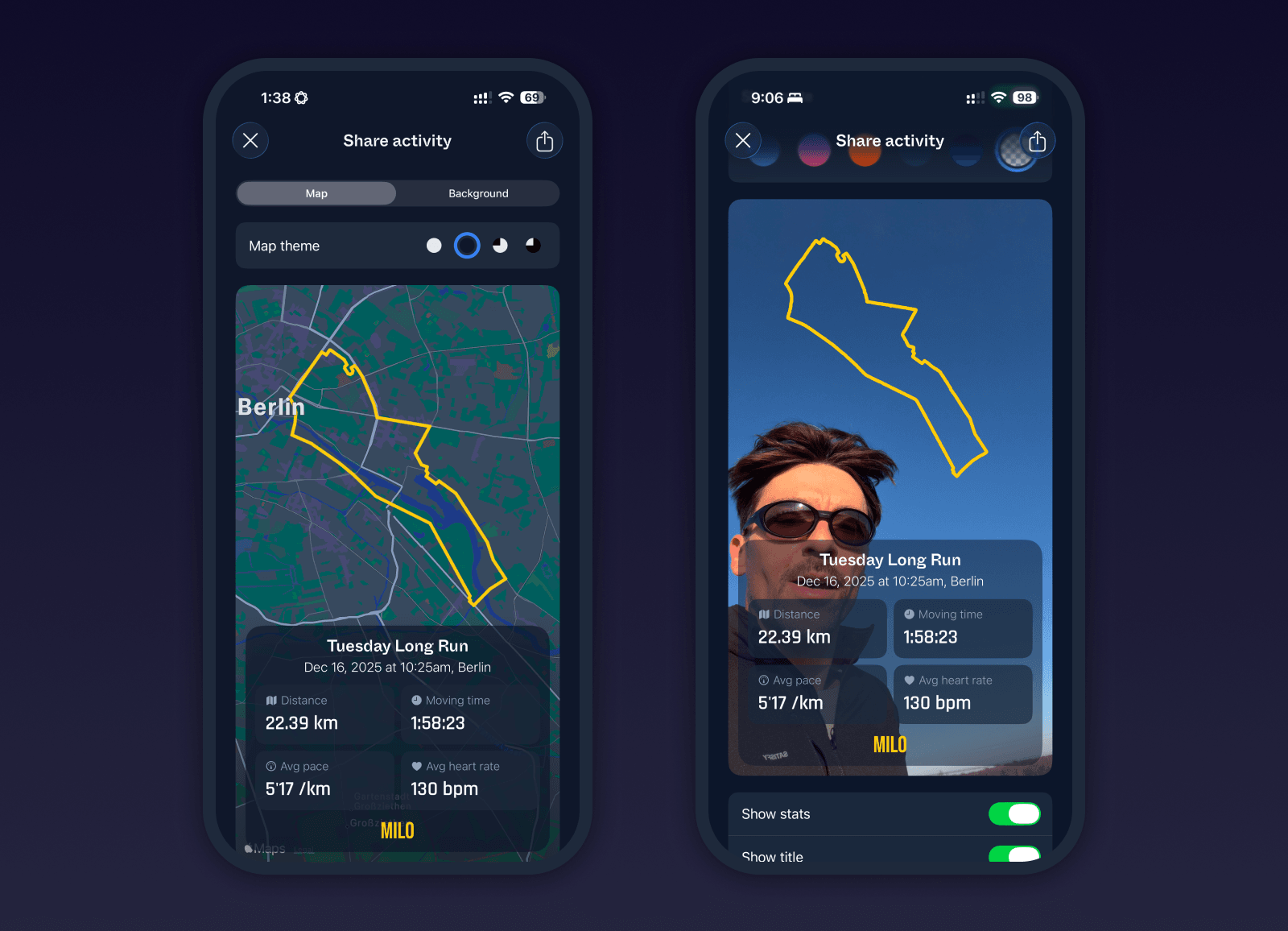
Activity sharing
You can now share your Milo activities straight from the app. Customize the map style, pick which stats to show, adjust stat themes and opacity, even hide the map entirely and add a background color or pull an image from your camera roll. Exports are optimized for social sharing and can be saved as backgroundless PNGs sized for Instagram Stories or TikTok. This is our first iteration of sharing in Milo, with more customization and formats planned next.
Maps and routes
Routes and maps received several upgrades. Routes can now be reversed from both phone and watch, with changes syncing instantly and reflected in live maps. Route direction and compass handling on watch have been optimized for better performance. Routes can now be shared via public links, allowing others to add them to Milo or download GPX files. GPX import is now supported on iOS, including files from the system picker, iCloud Drive, and Dropbox.
Bug fixes and improvements
Added export options and customization controls to activity sharing
Fixed map color and polyline issues in shared images
Added elevation graph to activity detail view
Cleaned up toolbar items and unified sizing and behavior
Restored selective color usage for maps, charts, and training load
Fixed skeleton loading padding and corner radius across views
Improved chevron rendering in live maps
Added option to hide or show direction markers in detail views
Added route sharing from route detail view