Changelog — iOS 1.0.20
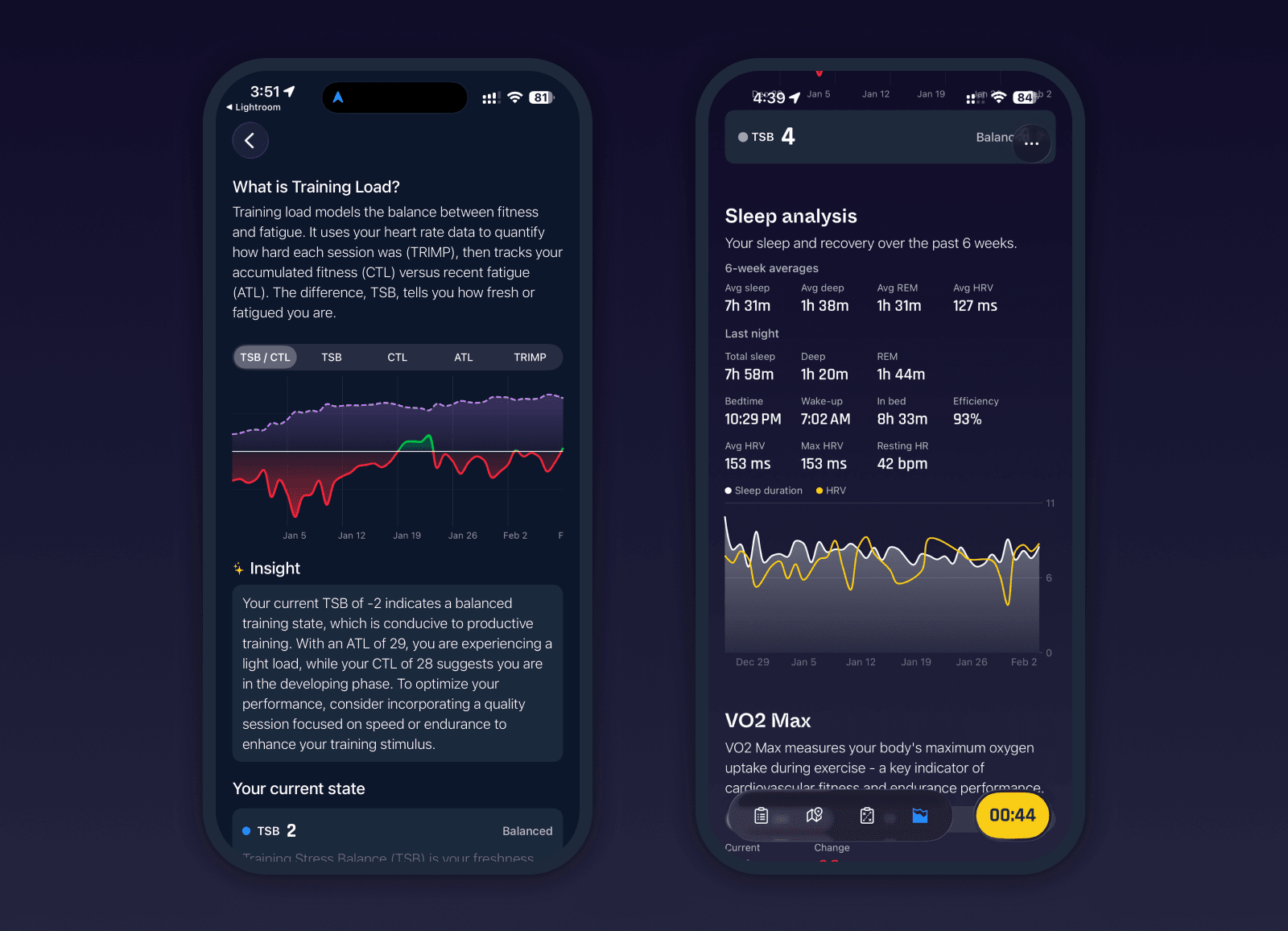
Refactored Insights and deeper analytics
Following up on the last update, we are doubling down on analytics, stats, and transparency. The Insights tab has been fully refactored again, both visually and technically, to support much deeper analysis while staying fast and responsive. All data is analyzed locally on your device. Activities remain private and are only cached for performance.
Best efforts and true PR detection
Milo now analyzes all your runs to identify best efforts across activities. Personal records for 5K, 10K, half marathon, and marathon are detected using best segments, not just standalone race activities. A best 10K effort can now come from within a longer run, such as a half marathon. You can tap into each PR to see where it came from and how it was achieved.
Data management and duplicate handling
A new Data management section in Settings gives full transparency and control over your activity data. You can regenerate all stats and insights at any time. Milo scans activities by type and source, detects duplicates, and groups them together. You can inspect how duplicates were detected and choose a different primary activity if needed, which will be reflected in PRs and stats.
This is especially useful if you record with devices like Garmin while also syncing Strava, which often creates duplicate HealthKit entries. Milo prioritizes the original recording source and stores any manual overrides so regeneration does not reset your choices. This is a technical feature, but one we built for ourselves and are now offering to you as well.
Reimagined training load
Training load has been redesigned from the ground up. The default view now overlays TSB and CTL, making it much easier to understand current readiness, fatigue, and injury risk at a glance. A new detail view shows daily TRIMP values, six weeks of underlying activities, and clear explanations for ATL, CTL, and TSB based on your own data.
You can now choose between normalized or exponential TRIMP, as well as Bannister or EMEA calculation methods, directly in Biometrics settings. This brings training load much closer to how serious runners actually reason about effort and recovery.
Sleep analysis
Sleep is now part of Insights. You can see six-week averages alongside your most recent night. Sleep plays a critical role in recovery, adaptation, and injury prevention for runners, and this is just the beginning. Sleep data will soon feed into training state and recovery suggestions.
VO2 max trends
A new VO2 max chart shows how your aerobic fitness is evolving over time. VO2 max is a key indicator for endurance performance and long-term progress, and seeing its trend alongside training load and volume adds important context to your training decisions.
Bug fixes and improvements
Added true PR detection using best segments across all runs
Added Data management view with activity breakdown by type and source
Improved duplicate detection and grouping with full transparency and manual override
Regeneration now recalculates PRs, training paces, training load, and stats
Deleting a Milo-recorded activity now also deletes it from HealthKit
HealthKit activities are recalculated on completion, including power, cadence, heart rate, and manual distance edits
Power meter cadence is now saved and included in activity data
Power meter source is saved and shown in power charts
Refactored Bluetooth sensor handling with better reconnection and clearer status
Fixed charts rendering correctly for activities without distance data
Improved performance and scrolling responsiveness in Insights
Added sleep data component to Insights
Added VO2 max component to Insights
Fixed HR and power charts for specific edge cases
Added dark and tinted app icons