Changelog — iOS 1.0.13
Indoor activity improvements
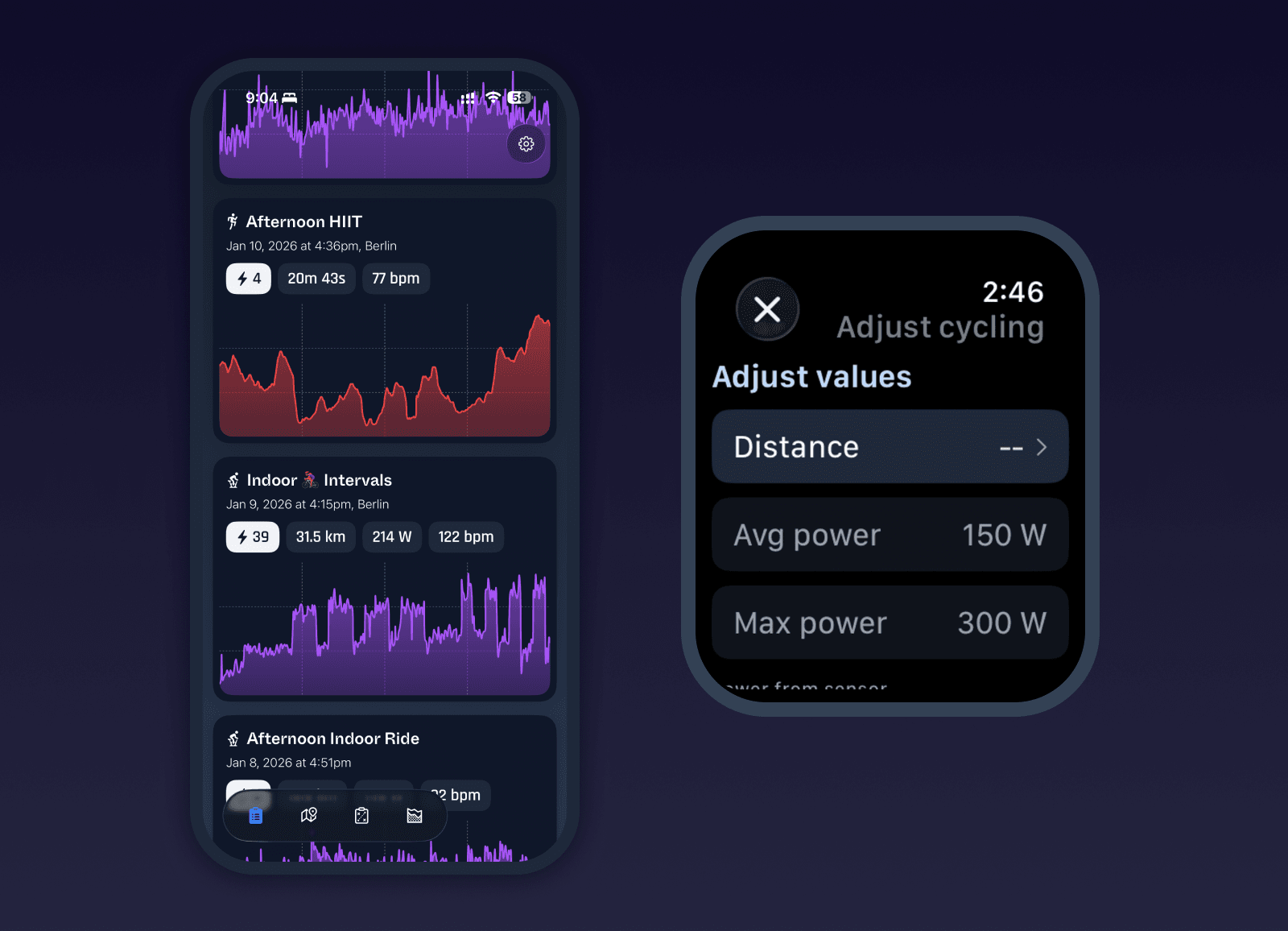
It’s winter, and many of us are spending more time indoors. This update leans into that. Most watches cannot reliably estimate indoor running pace. Now with this latest Milo update, you can manually set distance for indoor treadmill runs directly from the summary view on the watch after completing an activity. Updating the distance recalculates average pace and is saved correctly to Milo, including when sharing to Strava.
The same is now possible for indoor cycling. After completing an activity, you can manually set distance as well as average and maximum power. These power values are dynamically applied across all activity data points to create a realistic picture of power exertion, using heart rate as the underlying signal. This gives you a much more accurate indoor cycling history and allows these rides to contribute meaningfully to weekly volume and long-term stats.
Indoor activities in the activity list now show power or heart rate charts as their preview when available, making it easier to quickly understand effort at a glance.
Power meters and sensors
You can now pair bluetooth power meters with Milo. When a power meter is detected, power data is recorded and saved with the activity. This is especially useful for indoor cycling, where power is often the most reliable measure of effort. Power data is shown in activity detail views, used in charts, and included alongside other activity stats.
Training load and power insights
Stats have been refined to highlight effort and comparability across activities. Training load is now surfaced more prominently throughout the app, making it easier to compare exertion between runs, rides, and other activities. Power support has been expanded with sensor integration on the watch and new visualizations in activity detail views.
Bug fixes and improvements
Added manual distance adjustment for treadmill runs from the watch summary view
Added manual distance, average power, and max power adjustment for indoor cycling
Added power meter support on watch with automatic Bluetooth reconnection
Added power chart to activity detail view when power data is available
Displayed training load prominently on activity list items and as first stat in activity detail
Displayed distance and power stats on activity list items for cycling and other activities
Fixed HealthKit timestamp handling to respect original activity location time zone
Included all HealthKit activity types in the activities list and training load calculations
Improved fastest split calculations by filtering GPS jitter
Fixed bug showing elapsed time instead of moving time on watch during live activities
Fixed Watch Ultra Action button occasionally failing to start a run
Extended split alerts and workout transition views to 10 seconds with tap to dismiss
Fixed workout logic skipping rest blocks incorrectly
Refactored activity regeneration to reliably regenerate splits and handle missing stop events
Added activity icons to activity list items for easier scanning
Added option to send activity logs to Milo team from watch activity detail view
Fixed preferences not persisting when set during onboarding
Simplified onboarding by moving HealthKit and Location requests into the main app
Improved permission handling with clearer alerts on phone and watch
Added detailed permissions list showing individual permission states
Reshuffled settings pages to make important options easier to find
Added new Apple Watch settings page showing install, connection, and last-seen status
Improved auth and settings sync between phone and watch
Added power and heart rate charts to activity list items for indoor activities
Consolidated and cleaned up toolbar items in activity detail view